MVP
Overview
One of the earliest initiatives I worked on at Immersion was bringing haptics to mobile video, taking advantage of the actuators already built into mobile devices. The opportunity was strategic. As a haptics IP licensor, Immersion's business depended on proving out compelling use cases for its proprietary technology, which could render markedly clearer, sharper effects across a wide range of actuator types. Mobile video was one of the most universal things people did on their phones, so the thesis was direct: if a well-designed haptic track could play in tandem with a video, touch became a real value add for viewers and a concrete reason for partners to license more of the technology.
The ask
How might we enable creatives working with media to design haptics for video?
My role
I was the design lead across all three versions and produced the design work shown here, partnering with engineering on the signal path and the driver.
Challenges and assumptions
Audio designers and video editors both looked like ideal users, but the MVP timeline meant we could only support one to start. So the question became which established workflow to meet first. We chose audio designers in Avid Pro Tools, on the belief that audio and haptics go hand in hand.
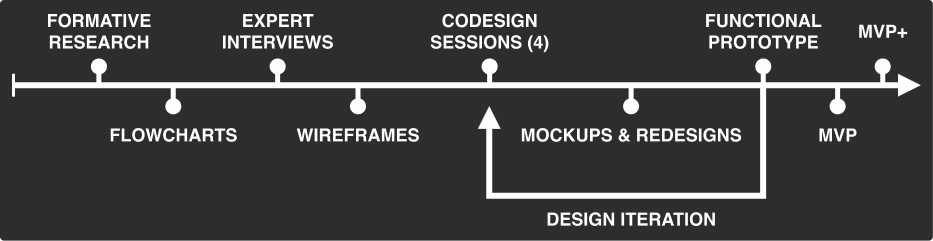
Initial results from research
We first tried automatic audio-to-haptics conversion as a Pro Tools plug-in. It never matched the quality of hand-crafted effects, so we changed the product: instead of generating haptics, Haptic Monitor would let audio designers feel haptics in real time as they designed them.
Pro Tools plugin that was not successful
The MVP was analog
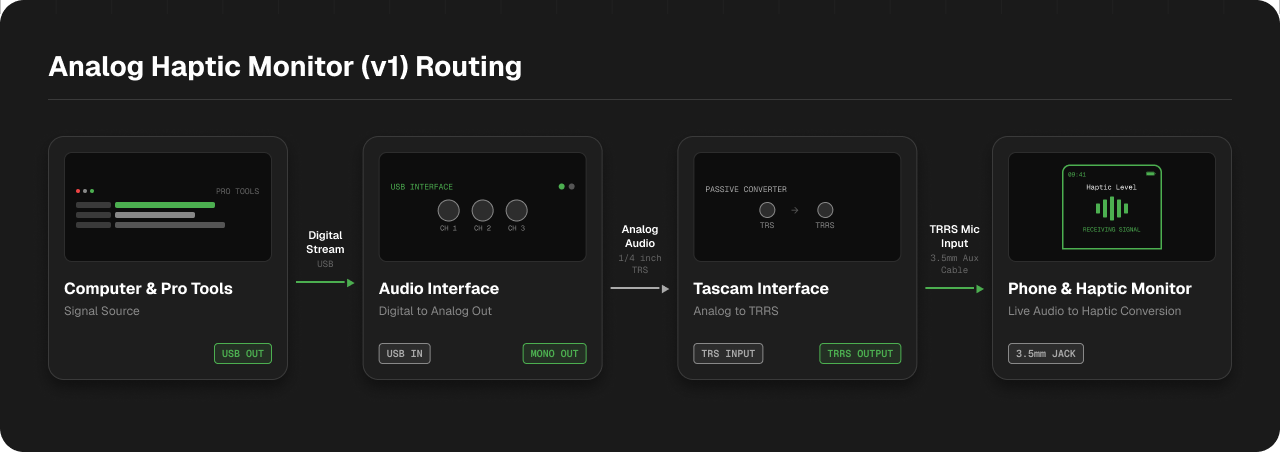
With automatic conversion off the table, the goal was to let audio designers create haptics inside their DAW. The catch: you have to feel what you're making in real time, and haptics are touch, so the designer has to move their hands off the keyboard to a device. We also didn't have time to build custom computer drivers. The workaround: convert audio to haptics in real time on an Android device, so we could ship just an app and route a mono audio signal from the computer to the phone with off-the-shelf audio parts.
Caveats led to design decisions
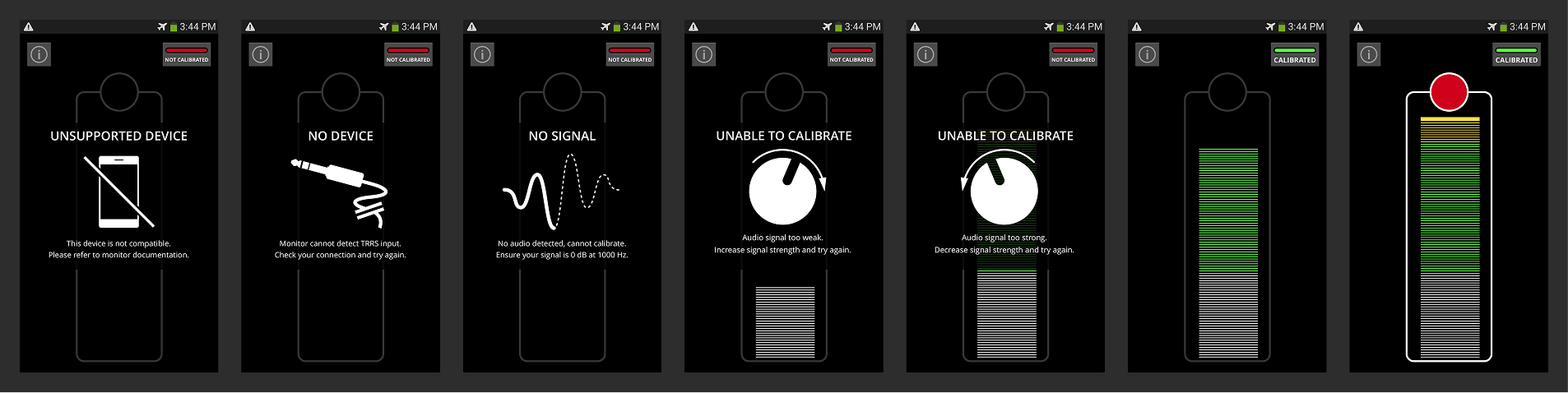
The analog approach came with a catch: the audio signal needed calibration. Too hot and it washed out the effects; too cold and strong effects felt weak. Two decisions handled it:
- A calibration step, with a clear signal for whether calibration was good.
- Styling the app as a VU meter, so signal strength read in a way audio designers already knew. It also gave a natural home for an error state when the signal ran past what calibration expected, easy to trigger with an accidental turn of a volume knob.
One honest limitation remained: because the signal was analog, and because of how we rendered it, the haptics you felt were slightly different from their encoded versions.
The MVP simulated a VU meter for calibration needs.
Version 2 – the change to digital
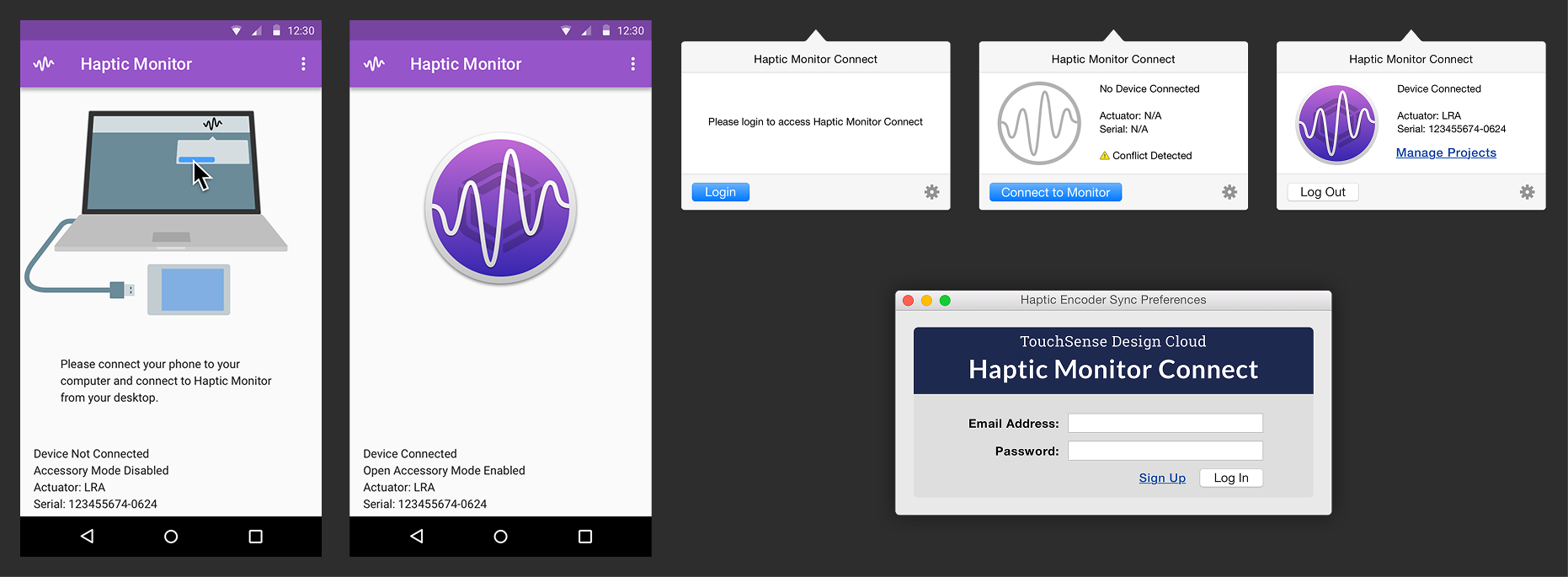
Going digital removed the reason for the VU meter, so the interface moved to Google's Material Design. The digital version needed a custom macOS driver, which could confuse people, so the disconnected state showed an illustration of the driver's popover with instructions to connect. The switch also fixed two version-1 pain points: staying tethered to the computer charged the phone, and the digital signal made effects feel true to their encoded versions.
Version 3 – connecting to the cloud
Version 3 (renamed Haptic Studio Mobile) connected to the cloud and closed the loop: design a haptic, encode it, and share it, end to end. We reworked the onboarding to bring in new users and re-orient people coming from earlier versions. By this point it was being used for haptic advertising and for prototyping game and UI effects.
Dashboard giving status of recent videos.
No connection state.
Onboarding flow to explain how to install drivers and connect.
Haptic Monitor became the enabling piece of the authoring workflow: without a way to feel haptics in real time as you design them, haptic creative work is nearly impossible. It let designers feel effects live, synced to the audio and video in their non-linear editor or audio workflow of choice.